crystal.Spritesheet
Spritesheets are the combination of a texture holding multiple frames of animation, and metadata on how to play said animations. The recommended way to create spritesheets in a format Crystal can load is to export them from Aseprite.
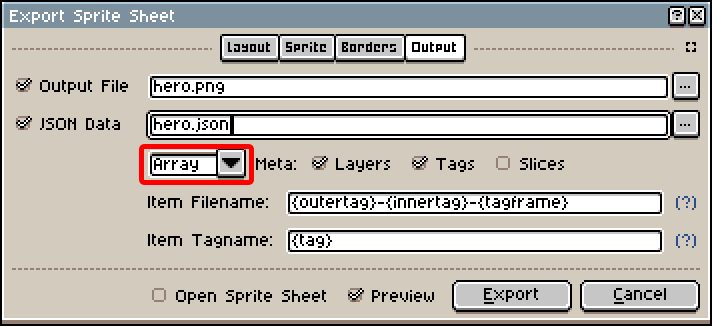
When exporting, make sure to:
- Check both
Output FileandJSON Data - Under
JSON Data, selectArrayand notHash
When loading the resulting .json file in Crystal, each Aseprite Tag is imported as an animation. If the timeline has nested tags, the inner tags will become sequences instead.
For example, consider this timeline setup in Aseprite:

Once loaded, this spritesheet contains:
- One
idleanimation containing 4 sequences (S,E,N,W). - One
walkanimation containing 4 sequences (S,E,N,W). - One
win-poseanimation containing a single sequence nameddefault.
The AnimatedSprite component can drive playback of spritesheet animations and draw them over time.
Constructor
You cannot construct spritesheets manually. Use crystal.assets.get to load them from disk.
Methods
| Name | Description |
|---|---|
| animation | Retrieves an animation by name. |
| image | Returns the love.Image containing the texture data for this spritesheet. |
Examples
local spritesheet = crystal.assets.get("assets/sprites/hero.json");
local walk = spritesheet:animation("walk");
local sequence = walk:sequence("N");
print(sequence:duration());
local spritesheet = crystal.assets.get("assets/sprites/hero.json");
local win_pose = spritesheet:animation("win_pose");
local sequence = win_pose:sequence(); -- This animation only has one sequence, so we can omit its name
print(sequence:duration());